Software · AI & Data · Product

Shawn Lasrado

I build software, ML and data products that ship, then write down exactly what they can’t do yet.

Full-stack developer. My recent projects run CI on every push, ship with a live demo, and list their own limitations.

I build ML and agent systems, score them on the metric that matters, and publish the numbers that make them look worse.

I founded a rental platform, led a $48M+ RFP at Kroger, and can still read the SQL behind the dashboard.

B.S. Computer Science @ University of Cincinnati Graduating Dec 2026 U.S.-based · open to relocation & remote


Selected work

Projects

Each one has its numbers, how it works, and what it still gets wrong. Open any card for the full write-up.

Health · Machine Learning · Jul 2026

Sepsis Early Warning

Flags 93% of septic ICU patients a median 12 hours before onset, and reports the false alarms too.

0.424
Normalized utility on held-out patients (official Challenge metric)
93%
Septic patients flagged in the useful window (370 of 398)
12 h
Median warning before onset, among those flagged
0.817
Hourly AUROC (AUPRC 0.092)

Python 3.13 · pandas · scikit-learn · FastAPI · Pydantic · pytest

One patient, replayed hour by hour
00.20.40.60.8 risk 10203040506070 hours in ICU alert threshold 0.32 onset, hour 69 first alert, 9 h early 00.20.40.60.8 risk 10203040506070 hours in ICU alert threshold 0.32 onset, hour 69 useful window first alert, 9 h early

Source: PhysioNet 2019 Challenge, held-out patient p010983. Scores precomputed by the committed model for the project's live demo.

Full write-up

On 4,441 patients it never saw in training, it flagged 93% of septic cases in time. It also alarmed on 59% of the patients who were fine, which is the number most launch posts would leave out.

The Problem

Every hour in an intensive care unit brings new vitals and labs. The PhysioNet/Computing in Cardiology Challenge 2019 asked a precise question about that stream: given everything recorded about a patient up to this hour, should the bedside get a sepsis warning now?

The Challenge’s own utility metric encodes the clinical trade-off. It rewards warnings 6 to 12 hours before onset, penalizes late or missed cases heavily, and charges a small cost for every false alarm. I scored against that metric directly instead of a proxy, because an hourly AUROC says nothing about whether an alert arrives in time.

What I Built

A gradient-boosting model that scores every ICU hour for every patient. When the hourly risk crosses 0.32, the alert fires. I trained it on 13,321 patients from the Challenge’s training set A and held out 4,441 more, split by patient, for the final test.

Around the model sits the usual plumbing, done carefully: a FastAPI service with a validated POST /score endpoint, a Docker image, CI that runs lint, tests and a container smoke test on every push, and a static demo that replays seven held-out patients hour by hour. Every score on the demo comes from the committed model, through the same validation and feature code as the API.

How It Works

  1. load.pyReads the Challenge’s per-patient .psv files: one row per ICU hour, 40 columns.
  2. features.pyBuilds causal time-series features. Every feature at hour t uses data up to t only: forward-fills, rolling and expanding windows, plus “measured this hour” and “hours since last measured” flags, because when a clinician orders a lab is itself a signal.
  3. train.pyPatient-grouped train/test split and CV folds. Tunes the alert threshold on 3-fold out-of-fold predictions, not on the model’s own training scores.
  4. evaluate.pyOfficial Challenge utility (the organizers’ code, vendored), AUROC/AUPRC, and a lead-time report that only counts alerts inside the rewarded window.
  5. app.py and the demoFastAPI scorer at POST /score. At build time, each demo patient is sent through the real endpoint and the responses ship with the static page.

Three decisions did most of the work:

  • Leakage is tested, not trusted. A unit test appends and corrupts future hours, then checks that every earlier feature is unchanged. In clinical time series, leakage hides in the plumbing. Writing that test was cheaper than auditing every feature by hand.
  • The threshold is tuned out-of-fold. In-sample utility was 0.67 against 0.42 on test. Tuning on in-sample scores would have picked a threshold for overconfident predictions.
  • Lead time is counted honestly. An alarm 30 hours before onset is not early detection; it fired before anything predictive was observable. Those alarms are reported separately instead of padding the average.

Results

Metric, 4,441 held-out patientsValue
Normalized utility (official Challenge metric)0.424
AUROC / AUPRC (hourly)0.817 / 0.092
Septic patients flagged in the useful window (12 h before to 3 h after onset)370 / 398 (93%)
Median warning before onset, among those flagged12 h
Patients without sepsis with at least one alarm2,381 / 4,043 (59%)
Septic patients who also alarmed before the useful window271 / 398 (68%)

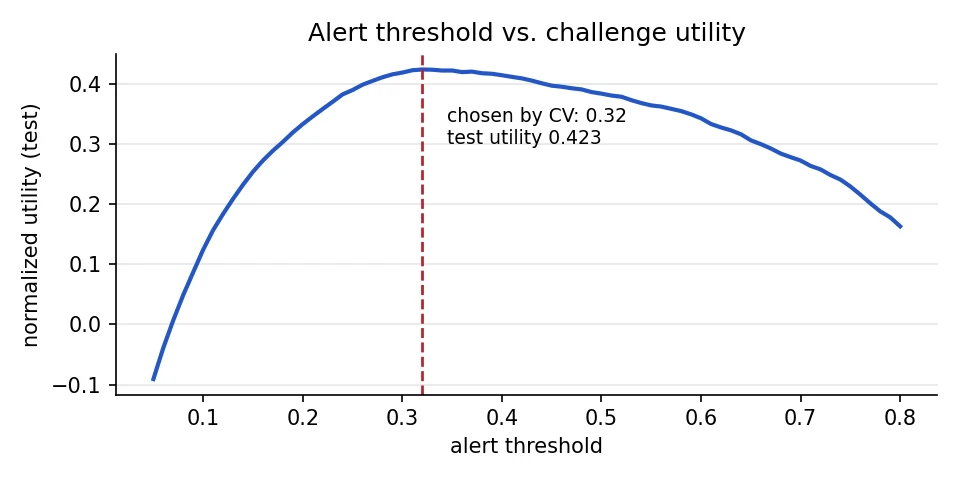
The threshold picked by cross-validation, 0.32, landed at the peak of the test utility curve, so the tuning generalized instead of overfitting.
Choosing where the alarm goes off
Line chart of normalized challenge utility on the 4,441 held-out patients across alert thresholds from 0.05 to 0.8. Utility climbs from about minus 0.1, peaks at 0.423 at the threshold of 0.32 chosen by cross-validation, then falls to about 0.16 at 0.8.

Source: docs/utility_vs_threshold.png in the project repository.

What 93% detection costs

Share of held-out patients, at the threshold chosen by cross-validation (0.32).

Septic patients flagged in the useful window 93% 370 of 398 Septic patients who also alarmed earlier 68% 271 of 398 Patients without sepsis who got an alarm 59% 2,381 of 4,043 Septic patients flagged in the useful window 93% 370 of 398 Septic patients who also alarmed earlier 68% 271 of 398 Patients without sepsis who got an alarm 59% 2,381 of 4,043

Source: PhysioNet 2019 Challenge, 4,441 held-out patients. sepsis-early-warning/artifacts/clinical_report.json

The last two bars are the cost of the first one. They belong in the same chart.

Limitations

Correction

An earlier version of my resume compared its score with the Challenge leaderboard, where the best official entries scored about 0.36. That comparison does not hold. Those entries were scored on hidden test sets that included a hospital no team had data from. This result is an internal split of a single hospital system, which is a much easier setting.

  • High alarm burden. At the utility-optimal threshold, most patients without sepsis alarm at least once during their stay. The metric charges only 0.05 per false-positive hour, so it tolerates this. A real deployment would need alert suppression or a stricter threshold.
  • Partial training data. Trained on 17,762 of the 20,336 patients in training set A. Training set B, the second hospital, was not used.
  • A strong baseline, not the state of the art. Leading approaches add sequence models and per-hospital calibration. These probabilities are not calibrated.
  • Research demo only. Not a medical device and not validated for clinical use. The demo replays de-identified Challenge patients and stores nothing.
What I’d Do Next

  1. Train on hospital A, test on hospital B. That is the honest external-validation experiment, and the number I would most like to see.
  2. Add alert suppression or a stricter threshold, then report the alarm burden again next to the detection rate.
  3. Try sequence models and per-hospital calibration, the approach the leading entries used, and keep this model as the baseline to beat.

Music · Full Stack · May 2026

Concert Radar

Concerts near you, ranked by how much you actually listen to each artist.

39
Tests covering scoring, matching, auth and caching, with no network or database
3 : 2 : 1
Weights for the last month, six months and all time
20
Top artists searched on Ticketmaster per user
50 mi
Search radius around your city

Python 3.12 · FastAPI · Pydantic v2 · PostgreSQL (Supabase) · Spotify OAuth · JWT

How an artist earns a spot at the top
Weight by listening window Last ~4 weeks x3 Last ~6 months x2 All time x1 Resulting score, out of 100 #1 in all three ranges 100 #1 in the last month only 50 #1 all time only 16.7 Weight by listening window Last ~4 weeks x3 Last ~6 months x2 All time x1 Resulting score, out of 100 #1 in all three ranges 100 #1 in the last month only 50 #1 all time only 16.7

Source: Concert Radar README. Score = sum of (50 minus list position) x weight, divided by 300.

Full write-up

A FastAPI and D3 app turns Spotify listening history into a ranked list of shows within 50 miles. A fuzzy matcher removes most tribute bands. Its accuracy is unmeasured, and the README says so.

The Problem

Ticketing sites list shows by date or distance. I wanted a list sorted by the artists I actually play, so the shows I would care about most would be at the top.

What I Built

A full-stack web app. You log in with Spotify, set your city, and get a feed of upcoming concerts within 50 miles, ranked by how much you listen to each artist. A D3 chart shows the affinity scores behind the ranking.

The full flow runs locally: Spotify login, sync, scoring, Ticketmaster search and the ranked feed. The public link is a demo that runs in the browser on made-up artists and shows, scored by the same formula the backend uses. No account needed.

How It Works

  1. Spotify syncThe backend fetches your top 50 artists for three time ranges: about the last 4 weeks, the last 6 months, and all time.
  2. Affinity score, 0 to 100Spotify returns ranked lists, not play counts, so the score is rank-based: 50 points for #1 down to 1 for #50, weighted 3, 2 and 1 by recency, divided by the 300-point maximum.
  3. Ticketmaster searchFor your top 20 artists, search music events within 50 miles. Your city becomes coordinates through OpenStreetMap Nominatim.
  4. Fuzzy matchingA keyword search also returns tribute acts and festivals. Comparing the artist against each event’s listed performers with difflib throws most of them out, with a stricter threshold when only the title is available.
  5. Ranked feedSorted by affinity, then by date. Cached per user for 6 hours.

Three engineering choices worth explaining:

  • Bearer tokens instead of cookies. The frontend is on GitHub Pages and the API on Render. Browsers increasingly block cross-site cookies, so the session travels as a JWT in the Authorization header.
  • One fetch function made the demo cheap. Every request already went through apiFetch(). Demo mode swaps what that one function calls and leaves the rendering code alone, so the demo runs the same UI as the real app.
  • All SQL in one module. Since every connection comes from get_db(), the tests swap in a fake that records queries. That is why 39 tests finish in about a second with no network.

Results

The full app works end to end locally. GitHub Actions runs the test suite and ruff on every push, and publishes the demo to GitHub Pages. The demo is about 40 KB of HTML, CSS and JavaScript and works on phone-sized screens.

Limitations

Correction

The first version cached shows by artist, for everyone. Two users in different cities who liked the same artist saw each other’s local shows, and changing your city deleted cached shows for other users. The cache now lives at the user level.

A second bug hid behind the first: a city with no matching shows left no cached rows, so every page load searched Ticketmaster again. The app now stores when each user’s concerts were last fetched instead of inferring it from the rows.

Spotify access tokens last an hour, and nothing called the refresh endpoint, so sync failed an hour after login. Sync now refreshes the token when it is within a minute of expiring.

  • Matcher accuracy is unmeasured. Its thresholds (0.70 for attraction names, 0.82 for event titles) were tuned by hand on real searches. There is no labelled dataset.
  • Spotify Development Mode only lets users added in the developer dashboard log in, which is why the public link is a demo.
  • Ticketmaster only. AXS, Dice, Eventbrite and many small venues are missing. The 20 artist searches run one after another to stay under the free-tier rate limit, so the first uncached load takes a few seconds.
  • Not production security. Spotify tokens are stored unencrypted, the session JWT lives in localStorage, and OAuth state is kept in process memory, so the backend must run as a single worker.
  • The tests never run real SQL. The fake database means a typo in a query would only show up against a real Postgres.
  • Free-tier hosting. Render sleeps when idle, so the first request takes about a minute, and Supabase pauses free projects after a week without activity.

What I’d Do Next

  1. Label a few hundred real search results and measure the matcher, so the thresholds stop being a guess.
  2. Move OAuth state and tokens into the database, encrypted, so the API can run more than one worker.
  3. Run the test suite against a real Postgres in CI, so the SQL gets tested along with everything else.

Consumer · AI Agents · Jun 2026

Shrinkflation Sleuth

An AI agent that turns 'this bag feels lighter' into the real price-per-ounce increase.

+12.2%
Average hidden price-per-unit increase across 29 documented size cuts
+25%
Worst case: Haribo Goldbears, 5 oz to 4 oz at the same $1.99
6
Playbooks in a single ADK LlmAgent
5
Read-only Elastic MCP tools, the agent's only data access

Python · Google ADK · Gemini Flash · Elasticsearch · ES|QL · Model Context Protocol

Same price, less bag
Bag size, ounces 9.25 9.75 oz Price per ounce, cents 49.1 56.1 +5.4% at the same $4.99 2020 $4.79 2021 2022 $4.99 2023 2026 $5.19 Bag size, ounces 9.25 9.75 oz Price per ounce, cents 49.1 56.1 +5.4% at the same $4.99 2020 $4.79 2021 $4.99 2022 $4.99 2023 $5.09 2026 $5.19

Source: Shrinkflation Sleuth dataset. Size change per FullCarts.org. Shelf prices (bottom row) are representative, not live quotes.

Full write-up

An AI agent built in three days for the Google Cloud Rapid Agent Hackathon answers the one question the shelf tag won't. Across 29 documented size cuts, the average hidden increase was 12.2%.

The Problem

Shrinkflation is when a product gets smaller while the price stays the same. Capital One Shopping research estimates it has touched roughly a third of grocery items. Shoppers notice, but nobody can easily answer the one question that matters: how much more am I paying per ounce?

What I Built

An AI agent that answers that question with a number and a source. Ask “Has my Doritos bag gotten smaller?” and it finds the product, pulls its size and price history, checks the documented size change and its source, and reports the effective price increase, a severity rating, a consumer tip and one suggested next check.

It is one Google ADK LlmAgent on Gemini. Its instructions hold six playbooks: product lookup, brand investigation, category analysis, shopping-list audit, trend dashboard and data discovery. Gemini picks the playbook for each question. All data access goes through five read-only Elastic MCP tools: search, esql, list_indices, get_mappings and get_shards. It does not browse or scrape; it answers from a curated dataset in Elasticsearch.

The live demo is a Sleuth Explorer. Hosting the full agent publicly would mean exposing an Elasticsearch cluster and a Gemini key, so the explorer runs the same playbooks in the browser, without an LLM, over the exact JSON documents the agent queries. Each panel shows the tool calls the agent would make. It says so on the page.

How It Works

  1. Find the productA fuzzy full-text search over the product catalog in Elasticsearch, through the MCP search tool.
  2. Pull the historyOne ES|QL query returns size and price over time and computes the price per unit at every point.
  3. Cross-check the eventLook up the documented size change and its source. Reports that exist only on r/shrinkflation are flagged as unverified.
  4. ReportLead with the effective price increase, which is always larger than the shrinkage percentage when the price holds. Then severity, a tip and a next check.

In production, two Cloud Run services: the official Elastic MCP server image over HTTP, and this repo’s FastAPI app serving the ADK chat UI. Locally, the agent starts a roughly 70-line Python MCP server over stdio that exposes the same five tools. Only the connection parameters change.

Results

Dataset and outcomeValue
Products · brands · categories34 · 16 · 7
History records170
Documented size cuts (verified)29 (24)
Unchanged control products5
Average hidden increase across the 29 cuts+12.2%
Average shrinkage across the same cuts10.2%
Worst caseHaribo Goldbears, +25%
Tests35

What I learned building it:

  • One agent with playbooks beat a pipeline of agents. I first sketched a sequential agent (lookup, analyze, report). That forces every question through a product lookup, which is wrong for “which category is worst?” A single agent with explicit playbooks has fewer moving parts and no handoff failures, and the tool sequence still shows in the trace.
  • Agent quality is mostly instruction quality. Real multi-step behavior came from playbooks where each step’s output feeds the next, plus explicit error paths: zero hits, missing history, and one retry on an ES|QL syntax error.
  • Report the right metric. The sticker price hides shrinkflation. The price per unit exposes it.

Limitations

Correction

An earlier version of my resume described it as a multi-agent system that scraped retailers and used an Elasticsearch vector store. It is one agent. It does not scrape. It searches a curated dataset with Elasticsearch full-text search and ES|QL, and there is no vector store.

  • No quantitative evaluation of the agent. The six query types were spot-checked by hand. Answer quality and tool-call accuracy were never benchmarked.
  • Demo-scale data. Sizes, dates and sources follow public reports, but prices are representative, not live quotes, and points between documented events are interpolated.
  • The original Elastic Cloud cluster has been shut down. Running the agent means loading the data into your own cluster.
  • The explorer imitates Elasticsearch. Its search mimics multi_match with fuzziness, so edge cases can rank differently.
  • A reproducibility bug, now caught. The pipeline was documented as deterministic but derived product codes from Python’s per-process salted hash(). A test now regenerates the data and fails if the committed files drift.

What I’d Do Next

  1. Benchmark the agent. A labelled set of questions with expected tool calls and answers, scored on every change.
  2. Replace representative prices with real price captures, so the hidden-increase numbers come from receipts rather than estimates.

Housing · Startups · May 2025

RentRadar

A crowdsourced rent and landlord platform. Second place overall, $5K in funding, live with 50+ users.

60
Active users in the first cycle
30
Reviews in the first cycle
50+
Active users on the live platform
$5K
Funding secured

React · Material UI · Python · Flask · LangChain · PostgreSQL (Supabase)

Full write-up

RentRadar crowdsources what renters actually pay and what landlords are actually like, so landlords cannot rewrite the story. It took second place overall at the CEAS Summer Innovation Challenge and is live with over 50 active users.

The Problem

Renters sign leases knowing very little: what others pay for similar places, and what a landlord is like to rent from. Landlords control the listing, so they control the story. RentRadar puts that information back in the hands of the renting community.

What I Built

A live web platform, at rentradar.org, where renters crowdsource honest information about properties and landlords. The site’s own pitch: understand your true cost of living.

As founder I led product, growth and monetization, not just the code. The frontend is React with Material UI. The backend is Python and Flask with LangChain, on PostgreSQL through Supabase, deployed with Supabase, Render and Cloudflare.

Results

In its first cycle, RentRadar reached 60 active users and 30 reviews. It took second place overall at the CEAS Summer Innovation Challenge and secured $5K in funding. The platform is live today with over 50 active users.

Limitations

Correction

An earlier version of my resume listed its stack as React and Firebase. The current platform runs React and Material UI on a Python, Flask and LangChain backend with PostgreSQL on Supabase.

  • Thirty reviews is a start, not a market. Rent comparisons only become reliable with enough reports per area and building.
  • Crowdsourced data is self-reported. TODO(shawn): how you handle fake or retaliatory reviews, if at all.

Hardware · Hackathon · Nov 2024

GCS: Geometric Code Slicer

Turns raw 3D-printer G-code back into a 3D model. Best Hardware Hack, MakeUC 2024.

Best Hardware Hack, MakeUC 2024
Winner
Best Hardware Hack, MakeUC 2024
2
Outputs from one upload: an .obj model and a .gif animation
0.2 mm
Layer height used to group points into faces
4
Teammates

Python · Flask · Matplotlib · imageio · HTML · CSS

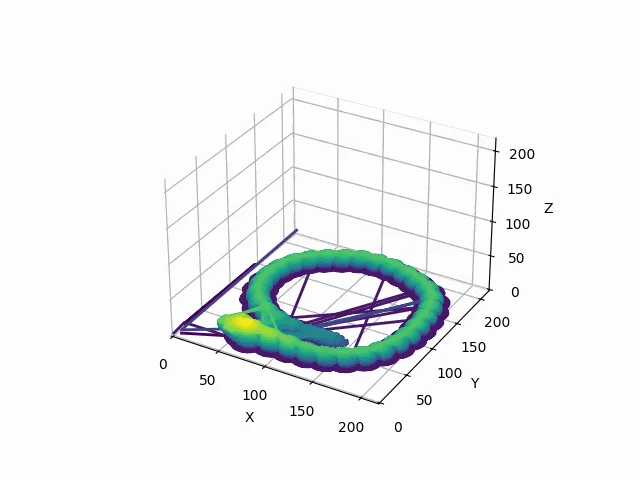
A 3D plot of a printed ring rebuilt from G-code, colored from purple at the bottom layers to yellow at the top.
Full write-up

Built by a team of four at MakeUC 2024, GCS reads a printer's instructions and works backward to the object, then animates the print layer by layer. The printer was not consulted.

The Problem

A slicer turns a 3D model into G-code, the line-by-line movement instructions a printer follows. The trip only goes one way. If all you have is the G-code, you no longer have the model, and you cannot see what a file will print without printing it.

What I Built

GCS, the Geometric Code Slicer, built at MakeUC 2024 with Caden O’Leary, Ibrahim Konare and Yiwei Wang. It is a Flask web app: drag in a G-code file, watch a progress bar, and download two things, an .obj 3D model rebuilt from the toolpath and an animated .gif of the print, layer by layer. It won Best Hardware Hack.

TODO(shawn): which part was yours. Your one commit on the shared repo is a single 198-line file, so a sentence on what you worked on during the hackathon would help.
What GCS sees in a G-code file
A 3D plot of a printed ring rebuilt from G-code, colored from purple at the bottom layers to yellow at the top, with a few straight travel lines crossing the build plate.

Source: final frame of the animation GCS generated for a sample file (processed/model_animation.gif in the project repository).

How It Works

  1. UploadDrag-and-drop a G-code file into the Flask app.
  2. ParseRegular expressions pull X, Y, Z and extrusion (E) values from every G1 move, carrying the last known position forward when an axis is missing.
  3. Build the meshConsecutive positions become edges. Points are grouped into 0.2 mm layers, and neighboring points in a layer form triangular faces. Y and Z are swapped to match the OBJ coordinate convention.
  4. AnimateMatplotlib draws one frame per layer on a purple-to-yellow gradient, and imageio stitches the frames into a GIF.
  5. DownloadThe .obj model and the .gif come back to the browser.

Results

Best Hardware Hack at MakeUC 2024, the University of Cincinnati’s hackathon. The figure above is the tool’s own output.

Limitations

  • Travel moves leak into the model. A move is kept if it extrudes or changes position, so non-printing G1 travel moves show up as stray lines, visible in the figure above.
  • G1 only. Rapid moves (G0) and arcs (G2, G3) are ignored, so curved toolpaths written as arcs come out incomplete.
  • A wireframe, not a solid. Faces join neighboring points within a layer. The result is a useful preview, not a watertight mesh you could print again.
  • Fixed layer height. Layers are grouped at 0.2 mm regardless of the file’s actual layer height.

What I’d Do Next

  1. Separate printing from travel by tracking whether extrusion actually increases between moves.
  2. Read the layer height from the file and support arc moves.
  3. Close each layer into a contour and loft between layers to produce a solid mesh.

Social · Machine Learning · Oct 2024

Hi-Five

Matches people on personality, not just shared tags, using OCEAN embeddings in a Neo4j graph.

5
OCEAN traits, each embedded from a free-text answer
60 : 40
Weight of personality similarity versus shared interest tags
3
Teammates at SASEHack
3 days
From first commit to last, October 4 to 7, 2024

Next.js · TypeScript · Python · Flask · Neo4j · BAAI/bge-en-icl

Full write-up

Built over a weekend at SASEHack with two teammates. Free-text answers for each of the five OCEAN traits become embeddings, and matches weigh personality 60 to 40 over shared interests.

The Problem

Modern matching apps compare tags and interest metrics. Two people who both list “hiking” match; two people who would actually get along may not. Hi-Five adds the missing signal: personality.

What I Built

A matching app built at SASEHack in October 2024 with two teammates. New users take a personality test based on the OCEAN model (openness, conscientiousness, extraversion, agreeableness, neuroticism) and pick interest tags. Hi-Five turns the answers into embeddings, stores everyone in a Neo4j graph, and suggests people with similar personalities and interests. From there users can swipe, send friend requests and chat.

My commits covered the Next.js frontend, login and interest tags, the API endpoints, and chat.

How It Works

  1. Personality testOne free-text answer per OCEAN trait.
  2. EmbedEach answer is embedded with BAAI/bge-en-icl, giving five trait vectors per person.
  3. GraphPeople, tags and friendships live in Neo4j.
  4. ScoreFor each candidate: the cosine similarity of each trait vector, averaged across the five traits, weighted 0.6, plus the Jaccard similarity of interest tags, weighted 0.4.
  5. SuggestThe highest-scoring candidates come back as suggested matches.

Results

A working end-to-end app at the end of the hackathon: personality test, embeddings, graph-based matching, swiping, friend requests and chat. TODO(shawn): any placement or judging result from SASEHack.

Limitations

Correction

An earlier version of my resume described a professional matching platform that combined embeddings with emotion classification (roberta-base-go-emotions). The public code matches on OCEAN personality embeddings and shared interest tags. It contains no emotion classifier.

  • Untested weights. The 0.6 and 0.4 weights are fixed in code. Nothing in the repository measures match quality.
  • A thin personality signal. Five free-text answers stand in for a validated personality inventory.
  • Hackathon code. The embedding server address is hard-coded, and the repository README is the default template.

What I’d Do Next

  1. Measure match quality, even with a small survey of whether suggested matches actually talked, and tune the weights against it.
  2. Use a validated personality inventory instead of five free-text prompts.

Fintech · Full Stack · Apr 2026

FRIP

Fractional rental investing: pooled ownership, proportional payouts and a five-factor risk score.

5
Factors in the 0 to 100 risk score
10
API endpoints across auth, properties, investments, valuations, portfolio and payouts
5
MongoDB collections

Python 3.12 · Flask 3.0 · MongoDB (PyMongo) · bcrypt · vanilla JavaScript · Chart.js 4

Full write-up

FRIP pools money into properties and pays out rental income in proportion to ownership. Flask, MongoDB, a five-factor risk score, and a respectful number of decimal places.

The Problem

Fractional ownership lets many people pool money into one rental property. It only works if every investor can see what they own, what it earns and how risky it is, and if the payouts are exactly right.

What I Built

FRIP, the Fractional Rental Investment Platform. Users register, browse properties with their funding progress, expected returns and monthly income, and invest. Every investment recalculates ownership shares across all investors in that property. An admin action distributes rental income to every shareholder in proportion to their stake.

A dashboard shows each user’s allocation as a doughnut chart, their holdings, transaction history, and a time-weighted return on their portfolio. The frontend is a single-page app with client-side routing and no full-page reloads.

How It Works

  1. AuthFlask sessions with bcrypt-hashed passwords.
  2. InvestPOST /investments records the amount and recomputes every investor’s ownership share for that property.
  3. DistributePOST /distributions/<property> pays out rental income proportionally and logs a transaction per shareholder.
  4. Risk scoreA weighted average of five factors, each from 0 to 1: valuation volatility (25%), investor concentration measured with the Herfindahl index (20%), funding level (20%), cap rate (20%) and depreciation (15%). Scaled to 0 to 100: under 30 is Low, 30 to 55 Medium, above 55 High.
  5. Time-weighted returnThe Modified Dietz method weights each investment by how long it was deployed, so a deposit made yesterday does not distort the return.

Results

A working full-stack app with ten API endpoints and five MongoDB collections (users, properties, investments, transactions and valuation history), deployed to Vercel. Risk scores appear on the property list, the property detail page and the portfolio, and the portfolio summary card shows the time-weighted return.

Limitations

  • The live demo is down. The deployed site loads, but its API currently returns a server error, so this story links to the code only. TODO(shawn): fix the Vercel deployment’s database connection, then add the demo link back.
  • No automated tests. The repository has none yet, which matters more for code that moves money around, even pretend money.
  • Pretend money. There are no real payments, KYC or legal structure behind the investments.
  • The README trails the code. The risk score, time-weighted return, valuation endpoint and valuations collection are in the code but not yet in the README, which still lists nine endpoints and four collections.

What I’d Do Next

  1. Bring the demo back up with seeded sample properties, so anyone can invest fake money in under a minute.
  2. Test the money paths first: share recalculation, payouts and the return calculation, with rounding cases.

Data Visualization · Feb 2026

World Health & Wealth

Five linked D3 views on how wealth relates to health across 165 countries.

5
Linked views: two histograms, a scatter plot, two choropleth maps
3
Country-level measures: GDP per person, life expectancy, under-five mortality
165
Countries in the cleaned dataset with GDP and life expectancy
2022
Most recent year common to all three measures

D3.js v7 · JavaScript · HTML · CSS · Python (preprocessing) · GeoJSON

Wealth and health, 165 countries
20406080 years $1k$10k$100k GDP per person, log scale Central African Rep. 18.8Japan 84.1Qatar 81.9UAE 80.5 20406080 years $1k$10k$100k GDP per person, log scale Central African Rep. 18.8Japan 84.1Qatar 81.9UAE 80.5

Source: Our World in Data, 2022, as cleaned for the World of Data dashboard (world_data.csv). The Central African Republic value matches the published OWID figure for 2022.

Full write-up

Two histograms, a scatter plot and two maps over Our World in Data's 2022 figures. Brush any one of them and the other four follow.

The Problem

How strongly is wealth connected to health across countries? Static charts answer one slice of that at a time. I wanted distributions, correlation and geography visible together, so that selecting a group in one view shows where it sits in all the others.

What I Built

An interactive dashboard over three Our World in Data measures for 2022: GDP per person, life expectancy at birth, and under-five mortality. Before writing any code I sketched the layout so every related view would be on screen at once, because brushing and linking only feel natural when nothing has to scroll.

The layout: two histograms for distributions, a central scatter plot for correlation, two choropleth maps for geography, dropdowns to switch measures, and an information panel linked to the current selection.

How It Works

  1. Preprocess in PythonFilter each CSV to the most recent common year, merge on country code, drop non-country entries, and keep only valid three-letter ISO codes so rows line up with the world GeoJSON.
  2. One selection stateEvery view reads from and writes to a single shared selection. When it changes, all views redraw.
  3. HistogramsBrush horizontally to select a value range. Hover a bar for its range and country count.
  4. Scatter plotDrag a rectangle to select many countries, click to select one, hover for exact values.
  5. MapsSequential scales with meaning: blue for GDP, green for life expectancy, deeper red for higher child mortality. Click a country to select it everywhere.

Results

Three patterns stand out once you start brushing. GDP per person and life expectancy rise together, with wealthier countries in the upper right of the scatter plot. GDP and under-five mortality move in opposite directions, which is clearest when you brush the low-GDP range and watch the maps. And the clusters are regional: many Sub-Saharan African countries sit in the low-GDP, high-mortality corner, while Western Europe and North America cluster at high income and high life expectancy.

The hardest part was the interaction logic in the scatter plot. The brush overlay kept swallowing clicks, and fixing it meant restructuring the event handling. Aligning country codes between the data and the GeoJSON was the other.

Limitations

  • One year only. The data is a 2022 snapshot, so the dashboard shows relationships, not change over time.
  • Linear GDP scale. GDP per person spans more than two orders of magnitude; a log scale would separate the low-income countries that bunch together on the left. The chart on this page uses one.
  • No color legend on the maps, and the layout is not yet tuned for small screens.
  • One outlier is real, not a bug. The Central African Republic sits at a life expectancy of 18.8 years, far below every other country. That is the figure Our World in Data publishes for 2022 (it reports 50.6 for 2020 and 57.4 for 2023), so the dashboard shows the source faithfully. A single-year snapshot cannot show that context.
  • AI tools helped debug D3 interactions and refine the layout. The data processing, design decisions and final integration were mine.

What I’d Do Next

  1. Add time, so the selection can be replayed across years.
  2. Add a log-scale toggle for GDP and a color legend on each map.
  3. Make it work on a phone.

Energy · Startups · Jan 2024

EcoStats

A student energy startup pairing an installed device with a data analytics engine. $500 in funding.

10%
Energy savings indicated by market research
$500
Funding won to reach the model and production stage
8 mo
Founder and CEO, January to August 2024

Data analytics · Market research

Full write-up

EcoStats paired an installed device with a data analytics engine. Market research pointed to 10% energy savings, and the $500 went toward a working model.

The Problem

Energy savings are easy to promise and hard to prove. EcoStats set out to deliver both: an installation that saves energy, and the data to show it.

What I Built

EcoStats paired an energy-saving installation with a data analytics engine. As founder and CEO from January to August 2024, I led the company and ran the market research behind its claim of 10% energy savings.

TODO(shawn): LinkedIn describes an “electromagnetic clank installation”. What is the device? Fix the wording here and on LinkedIn.

Results

Market research pointed to 10% energy savings. EcoStats won $500 in funding to take the project to the model and production stage.

Limitations

  • Savings are a research figure, not a measured result. LinkedIn calls the 10% “guaranteed”; it is reported here as what the market research indicated.
TODO(shawn): confirm the location (Cincinnati?) and what happened to EcoStats after August 2024.

Health · Machine Learning · Oct 2026

AFib ECG Classifier

Classifying single-lead ECG recordings, with a demo that includes model mistakes.

0.780
Held-out mean F1 across Normal, AFib and Other, using the challenge metric; not a leaderboard result
0.667
Logistic regression baseline held-out mean F1 using the same metric
1,705
Held-out test recordings after excluding the duplicate test signal
34
Features used by the gradient boosting model

Python 3.13 · SciPy · scikit-learn · React · Bklit UI · pytest

Full write-up

A classical machine learning pipeline classifies ECG recordings as Normal, AFib, Other rhythm or Noisy. The demo shows held-out examples, detected beats and predictions. There is no clinical validation.

The Problem

This project asks whether classical machine learning can classify single-lead ECG recordings from the PhysioNet/CinC Challenge 2017 dataset as Normal, AFib, Other rhythm or Noisy. Beat timing is part of the signal: AFib often appears as irregularly spaced heartbeats.

What I Built

A Python pipeline that reads ECG recordings, detects candidate beats, extracts features and trains a gradient boosting classifier. It compares the model with a majority-class baseline and logistic regression based on beat intervals.

A React demo shows curated held-out recordings with detected peaks, the true label, the model prediction and probabilities. It includes mistakes. The selection is for inspection and is not an evaluation set.

How It Works

  1. Read the signalConvert each recording to millivolts using its WFDB header. Read the sampling rate from the header instead of assuming it.
  2. Detect candidate beatsApply a band-pass filter, an energy envelope and SciPy peak detection. Markers follow absolute filtered extrema, so they can land on an S wave.
  3. Extract featuresSummarize the intervals between beats, signal quality, waveform shape and recording duration.
  4. Select the modelTrain a class-balanced scikit-learn HistGradientBoostingClassifier. Choose settings through cross-validation on the training split only. There is no deep learning.
  5. Evaluate and inspectEvaluate on held-out recordings, then show selected examples and errors in the demo.

The design and evaluation rules were frozen before fitting. The test set was never used for tuning. Training writes the results to artifacts/results.json, which the README identifies as the source of its reported numbers.

Results

The gradient boosting model scored above the logistic regression and majority-class baselines on the held-out test set. The reported challenge metric averages F1 for Normal, AFib and Other rhythm; Noisy predictions still count in errors. These are local held-out results, not official leaderboard results, because the challenge’s private test set was not used.

Other rhythm and Noisy are the weakest classes. The README publishes per-class precision, recall and F1 alongside a confusion matrix, so the overall score can be read with the errors behind it.

Limitations

  • The split is by recording, not patient. The inspected headers and labels have no documented patient IDs. Recordings from the same patient may appear in both splits, which can inflate scores. An exact duplicate crossed the split; its test copy was excluded before fitting any model.
  • The data covers a limited setting. The dataset is small, with short recordings from a single lead and device. Labels are noisy, Other combines different rhythms, and Noisy has few test examples.
  • Beat detection has limited validation. It was checked on synthetic signals only. The README claims no accuracy against expert beat annotations.
  • Probabilities are uncalibrated. The curated demo includes errors and cannot establish model performance.
  • Saved artifacts have caveats. The README points to a release review covering stale final-split count metadata and limits of the saved model hashes.
  • No clinical validation. This is not a medical device and is not for diagnosis.

Imaging · Python · Oct 2026

Photomosaic Poster

Turn a target photo and a folder of pictures into a print-ready mosaic poster.

600
Photos in the generated example mosaic
175 megapixels
Print size the strip-based renderer can fit in memory
75 MB
Maximum file size for the plotter-bond preset
300 DPI
Resolution sent by the plotter-bond preset

Python 3.9+ · rawpy · av

Full write-up

Photomosaic Poster takes a target image and a collection of photos through selection, matching, printer checks and paper previews, then exports files for different print workflows.

The Problem

A photo mosaic has to preserve two views at once: individual photos should be recognizable up close, while their colors and placement form the target image from across the room. Preparing a poster adds practical constraints. Photos arrive in different formats, the image has to fit a paper size, and each printer may require a particular color mode, resolution or file-size limit.

What I Built

Photomosaic Poster is a Python command-line tool for making photo mosaic posters, with a browser version of the same engine. Its workflow starts before rendering: friends can upload photos to the user’s computer, and compare scores target candidates and shows mosaic previews. The check command tests a proposed job against a printer preset before a full render.

The renderer writes a report alongside each poster. The HTML report includes views at different scales and a paper preview, printer-rule checks with recommendations, and a checklist for taking the file to the printer. When a printer rejects a file, --fallbacks can produce PDF, JPEG, RGB and CMYK alternatives; --test-strip can create a small test print.

How It Works

  1. Collect and chooseFriends can upload photos from their phones to the computer running the collection command. The compare command scores target candidates and shows side-by-side mosaic previews.
  2. Check the printerSelect a preset such as plotter-bond, photo-lab or canvas. The preset supplies requirements such as resolution, color mode, file type and size limit; command-line options can override them.
  3. Prepare the photosImages are decoded upright, cropped square and cached. Exact duplicates and Mac zip junk are dropped, while similar photos are grouped using a perceptual hash. Zip archives can be read directly, and video frames are opt-in.
  4. Match tilesThe target is cropped to the poster shape and averaged into a grid. Each tile is matched to a photo by color in CIE Lab; the matcher limits repeats, separates look-alikes and gives every distinct photo a spot.
  5. Render for printTint and an optional faint, sharpened target overlay adjust the image. The poster is drawn in strips to limit memory use, then converted to the requested color mode and saved at the best quality that fits the size limit.
  6. Review and recoverThe HTML report previews the poster on the selected paper and lists printer checks and recommendations. Test strips, panels and alternate output formats provide options for print jobs that need adjustment.

Limits

  • The browser version runs on the user’s device and creates RGB files only. Use the Python command-line tool for CMYK output, camera RAW decoding and batch work.
  • Camera RAW decoding requires the optional rawpy dependency. Video-frame support requires optional av and must be enabled with --include-videos.
  • Paper simulation is an approximation. When the print shop provides an ICC profile for the printer and paper, the tool can use it for a soft proof.
  • Repeats become noticeable above about four to five uses per photo. The README’s default grid aims for tiles about half an inch across, and suggests collecting more photos or reducing the number of columns when repeats are too frequent.
  • The documented demo images are generated, rather than photos from a real event.

Birthdays · Front End · Oct 2026

Your Virtual Scrapbook

A flip-through birthday book where each friend's note and photos become their own designed page.

15
Friends in the original birthday book
~100
Photos and videos in that book
14
Fictional friends in the local demo, one per page style
4
Phone rendering fixes learned on real devices and now built in

Next.js · GSAP · canvas-confetti

Full write-up

Next.js, GSAP and canvas-confetti turn a data object into a book with 3D page turns and a page style per friend. The repo is the engine pulled out of one real gift book, with multi-user sharing and AI page picking still on the roadmap.

The Problem

The first book was a one-off build for a friend’s 22nd birthday: 15 friends, about 100 photos and videos, opened almost entirely on iPhones and iPads. It works, but it stays private and it is tied to that one person. The repo takes the reusable part, the engine, and moves every personal detail into data, on its way to becoming something anyone can make.

What I Built

A book engine plus a demo book. Each friend’s contribution becomes one page, and every page uses a design chosen to fit what they sent: a postcard from where they are, polaroids and a friendship receipt, photos pegged to fairy lights you drag sideways, a home-video frame with a timecode, a photo-booth strip, instant photos that develop when tapped, toy blocks with real physics, tap-through stories, a slider through the years, a 3x3 jigsaw, airplane window shades, plates ordered at a little restaurant, two neon lines that merge, a route with checkpoints, and simpler photo piles.

The README’s demo is local: run it and open /demo for a fictional book for Alex from fourteen fictional friends, one for each page style. The images in it are generated illustrations, not real photos.

How It Works

  1. Book datasrc/engine/types.ts defines a Book: the recipient, the page setup for each friend, and their contributions. Every style reads its text, titles, stamps and checkpoints, from that data, with neutral defaults.
  2. A page style per friendThe README’s table lists the styles, from postcard and years to birthdays, dump and auto. src/demo/book.ts shows an example of each.
  3. The enginesrc/engine/ holds the 3D page turns, the photo viewer, stickers, sound and the styles. It began as plain browser scripts in legacy/; mount.ts supplies the globals they expect and loads them in order inside the <Scrapbook> client component.
  4. Demo mediascripts/make-demo-media.mjs generates the demo’s illustrated placeholder photos and videos.
  5. A book you flip throughPages turn in 3D, jumps from the contents page play a single turn, and the whole thing runs in the browser.

Four things learned the hard way on real phones, now built in:

  • Long jumps skip ahead. Jumping from the contents page moves silently to the page before the target and plays one turn, instead of drawing every page in between, which crashed iPhones.
  • Pages sit a fraction of a pixel apart in 3D, because Safari sorts 3D layers by depth and ignores z-index.
  • The turning page’s shadow is its own layer, faded by opacity, so iOS doesn’t repaint the whole page each frame.
  • No SVG filter effects, because they are redrawn in software every frame of a 3D page turn.

Where It Stands

Roadmap step 1 is done: the engine is extracted, the personal details live in data, and there is a demo book. npm run dev serves it at localhost:3000/demo, npm run build makes a production build, and node scripts/make-demo-media.mjs regenerates the demo media. The README lists the stack as Next.js, GSAP and canvas-confetti.

Limitations

  • The demo images are generated illustrations, not real photos.
  • The original book stays private. This repo is only the engine, so nothing here contains the real 15-friend book.
  • No shared books yet. Roadmap step 2, an organizer creating a book and sharing one invite link so friends add notes and media from their phone with no account, is not built. Supabase for accounts, database and storage is planned.
  • No AI yet. Reading each note to pick a style and its details for the organizer to review is roadmap step 3, and the Claude API is listed as planned rather than in use.
  • The engine is still legacy scripts. The README says they will be ported to typed modules over time, so the page styles run through the globals that mount.ts supplies.
  • The README’s demo route is local, at localhost:3000/demo after npm run dev.
  • Roadmap step 4, a live photo wall for the day itself, video support and polish, is still ahead.

What I’d Do Next

  1. Ship the invite link so an organizer can create a book and friends can add their note and media from their phone, with no account.
  2. Add the AI page suggestions that read each note and propose a style, for the organizer to review.
  3. Build the live photo wall for the day itself, with video support and polish.

Work

Experience

May 2026 to Aug 2026Cincinnati

Kroger FinanceContracting Efficiencies & Enablement Intern

I led two technology RFPs on the Contracting Efficiencies team, including a $48M+ AI sourcing initiative for ML-based produce-freshness solutions, and built a pipeline that categorized ~20% of the team's technology spend.

$48M+
AI sourcing initiative led end to end
2
Technology RFPs led
~20%
Of the team's technology spend categorized by my pipeline
Details

I led two technology RFPs on the Contracting Efficiencies team. The larger was a $48M+ AI sourcing initiative for ML-based produce-freshness solutions, where I drove the technical evaluation of competing machine learning offerings, the sourcing process, and cross-functional communication end to end.

I also built a data pipeline to categorize and align roughly 20% of the team’s technology spend. It surfaced vendor consolidation opportunities and fed into sourcing decisions.

Jan 2025 to Aug 2025Cincinnati

Kroger Technology & DigitalPortfolio Analyst Intern

Power BI dashboards for IT incident and outage data, adopted by 50+ IT staff and improving outage detection analysis by 25%. Coupa and Oracle reporting over $80M+ in vendor spend for 30+ finance managers.

50+
IT staff using the outage dashboards
25%
Improvement in outage detection analysis
$80M+
Vendor spend covered by Coupa and Oracle reporting
30+
Finance managers using the reporting spaces
Details

I built Power BI dashboards for IT incident and outage data, combining structured logs with freeform entries. They made Time to Detect, Time to Resolve and root-cause trends visible by team and application. More than 50 IT staff adopted them, and outage detection analysis improved by 25%.

On the finance side, I designed and optimized the Coupa and Oracle reporting spaces used for spend comparisons across more than $80M in vendor spend. That meant better layouts, refined filters, and accurate calculations for location-specific time off among offshore contractors. Reporting became more efficient for more than 30 finance managers.

I also evaluated Power Automate for moving Coupa data into Power BI without manual steps, which laid the groundwork for repeatable, automated reporting cycles. I built documentation frameworks for tracking multi-year Statement of Work costs, and ran offshore desktop inventory reporting with 10 global vendors: validating and cleaning their Excel submissions and consolidating more than 150 line items a month into pivot-based summaries for leadership.

I also learned to write the same finding two ways: once for executive stakeholders, once for the operational teams who run the systems.

May 2024 to Aug 2024Ohio

Owens CorningData Analyst Intern

Remote monitoring for four plants (Toronto, Waxahachie, Memphis, Medina). 98%-accurate anomaly thresholds, real-time detection automated at a 99.3% success rate, and a 10% efficiency gain from cloud-based analysis.

4
Plants monitored: Toronto, Waxahachie, Memphis, Medina
98%
Accuracy of upper and lower limit thresholds
15%
Glass-heat anomaly detected
99.3%
Success rate of automated real-time anomaly detection
Details

I joined the remote monitoring team for the Toronto and Waxahachie plants. Day to day that meant report checks and data visualization; the larger piece of work was six months of plant history, which I used to set upper and lower limit thresholds that proved 98% accurate. Those thresholds caught a 15% anomaly in glass heat levels, which led to a multi-system reorganization and new data solutions.

With Power BI, Seeq, TwinThread, Python and Excel, I helped redevelop the code that automates real-time, graph-based anomaly detection. It reached a 99.3% success rate and helped reduce downtime.

For the Memphis and Medina plants I ran cloud-based anomaly detection analysis and refined the sheet position radius. That led to better allocation of skilled labor and a 10% improvement in operational efficiency.

Jul 2019Dubai

Brighter PrepData Research Analyst

A one-month data research role in Dubai, the summer before my final two years of high school.

Details

The earliest role on my record: one month of data research in July 2019. TODO(shawn): one or two sentences on what you researched and what you produced.

Community

Leadership

SASE, from intern to regional coordinator in under three years.

  1. Intern Jan 2024 to May 2024
  2. Outreach & External Relations May 2024 to May 2025
  3. Co-President May 2025 to May 2026
  4. South Central Regional Coordinator Jun 2026 to Present

    Working with representatives from 25+ chapters to organize national and regional conferences that promote networking between students and company representatives.

Kroger · Jun 2026 to Aug 2026

Intern Ambassador

Intern Ambassador for Kroger during the same summer as my Kroger Finance internship.

TODO(shawn): what the ambassador role involved

School of Information Technology, University of Cincinnati · Aug 2024 to Dec 2024

Student Worker

I helped organize and run School of IT events, including the academic achievement dinner, and helped professors coordinate student meetings and advising sessions.

University of Cincinnati · Feb 2023 to Apr 2026

Service Desk Assistant

Over three years at the service desk I helped more than 750 students with move-ins and move-outs, managed package check-ins and resident lockouts, and cut student wait times by 20%.

GEMS New Millennium School · Jun 2021 to Aug 2021

Student Teacher

The summer after finishing high school, I spent three months as a Student Teacher at GEMS New Millennium School.

TODO(shawn): subject and grade you taught

TEDxGnms · Oct 2020

Speaker

I spoke for eight minutes on perseverance at TEDxGnms, in front of more than 200 people.

TODO(shawn): link to the talk video, if it is online

GEMS New Millennium School · May 2020 to Jun 2021

Knowledge Hour President

I served as President of Knowledge Hour at GEMS New Millennium School for just over a year.

TODO(shawn): what Knowledge Hour is and what you ran as president

  • Duke of Edinburgh Silver Award
  • Azure Machine Learning Development: Part 1
  • Advanced Java Programming
  • AutoCAD 2024 Essential Training

About

Dubai to Cincinnati

I grew up in Dubai. I finished high school at GEMS Education in 2021, gave a TEDxGnms talk on perseverance along the way, and spent my last summer there as a student teacher. In January 2022 I moved to Cincinnati to study computer science at the University of Cincinnati, where I graduate in December 2026 with a minor in information technology.

Since then I have done analytics at Owens Corning, portfolio and finance work at Kroger, founded a rental platform, and built machine learning and full-stack projects. I write each one up the same way: what I built, what the numbers are, and where they stop holding up.

Coursework: AI, Machine Learning, Algorithms, Database Design, Data Visualization, Operating Systems, Networking.

  1. 2017Dubai

    High school at GEMS Education

  2. 2019Dubai

    First data role: research analyst at Brighter Prep

  3. 2020Dubai

    TEDxGnms talk; Knowledge Hour president

  4. 2022Cincinnati

    Moved to study computer science at the University of Cincinnati

  5. 2024Cincinnati

    Owens Corning data internship; Best Hardware Hack at MakeUC

  6. 2025Cincinnati

    Kroger Technology & Digital; founded RentRadar; SASE co-president

  7. 2026Cincinnati

    Kroger Finance; SASE South Central Regional Coordinator; graduating in December

Languages & Frameworks

  • Python
  • TypeScript
  • JavaScript
  • SQL
  • C++
  • Java
  • HTML/CSS
  • React
  • FastAPI
  • Flask
  • Next.js
  • Node.js
  • D3.js

AI / ML

  • Google Cloud ADK
  • Gemini
  • Elasticsearch
  • Neo4j
  • LangChain
  • vector embeddings
  • scikit-learn
  • pandas
  • NumPy

Cloud & Tools

  • GCP
  • Firebase
  • Supabase
  • AWS
  • Git
  • Docker
  • Power BI
  • Azure ML
  • Power Automate
  • Oracle
  • Coupa
  • ServiceNow
  • Excel

Off the clock

Interests

Piano

I play. Requests are taken, not guaranteed.

TODO(shawn): what you play and for how long

Vlogs

I film and edit my own. The editor and the subject agree on most cuts.

TODO(shawn): link to the channel

Food

Massive foodie, by my own description, which I stand by.

TODO(shawn): a favorite dish, a Cincinnati spot, and the food you miss from Dubai

Travel & beaches

Will go anywhere with a coastline.

TODO(shawn): favorite beach, places visited

Fridge magnets

I collect as many as possible. Fridge capacity is under review.

TODO(shawn): how many, and the best one