Projects · Hardware · Hackathon · Nov 2024
GCS: Geometric Code Slicer
Turns raw 3D-printer G-code back into a 3D model. Best Hardware Hack, MakeUC 2024.
Best Hardware Hack, MakeUC 2024
Built by a team of four at MakeUC 2024, GCS reads a printer's instructions and works backward to the object, then animates the print layer by layer. The printer was not consulted.
The Problem
A slicer turns a 3D model into G-code, the line-by-line movement instructions a printer follows. The trip only goes one way. If all you have is the G-code, you no longer have the model, and you cannot see what a file will print without printing it.
What I Built
GCS, the Geometric Code Slicer, built at MakeUC 2024 with Caden O’Leary, Ibrahim Konare and Yiwei Wang. It is a Flask web app: drag in a G-code file, watch a progress bar, and download two things, an .obj 3D model rebuilt from the toolpath and an animated .gif of the print, layer by layer. It won Best Hardware Hack.
TODO(shawn): which part was yours. Your one commit on the shared repo is a single 198-line file, so a sentence on what you worked on during the hackathon would help.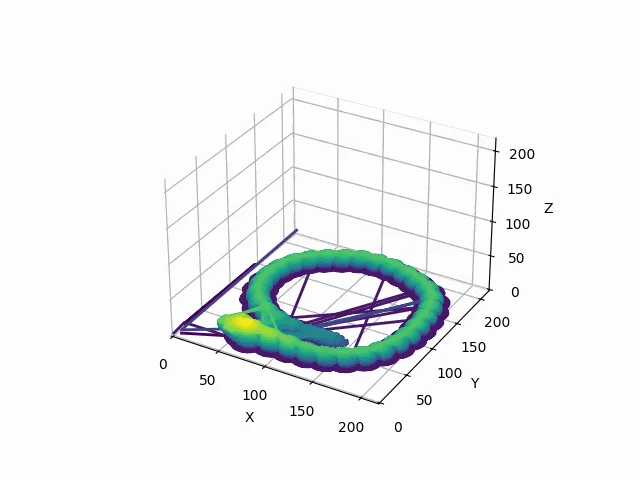
Source: final frame of the animation GCS generated for a sample file (processed/model_animation.gif in the project repository).
How It Works
- UploadDrag-and-drop a G-code file into the Flask app.
- ParseRegular expressions pull X, Y, Z and extrusion (E) values from every G1 move, carrying the last known position forward when an axis is missing.
- Build the meshConsecutive positions become edges. Points are grouped into 0.2 mm layers, and neighboring points in a layer form triangular faces. Y and Z are swapped to match the OBJ coordinate convention.
- AnimateMatplotlib draws one frame per layer on a purple-to-yellow gradient, and imageio stitches the frames into a GIF.
- DownloadThe .obj model and the .gif come back to the browser.
Results
Best Hardware Hack at MakeUC 2024, the University of Cincinnati’s hackathon. The figure above is the tool’s own output.
Limitations
- Travel moves leak into the model. A move is kept if it extrudes or changes position, so non-printing G1 travel moves show up as stray lines, visible in the figure above.
- G1 only. Rapid moves (G0) and arcs (G2, G3) are ignored, so curved toolpaths written as arcs come out incomplete.
- A wireframe, not a solid. Faces join neighboring points within a layer. The result is a useful preview, not a watertight mesh you could print again.
- Fixed layer height. Layers are grouped at 0.2 mm regardless of the file’s actual layer height.